The QR code quiet zone: why four modules, and what happens with less
A QR code needs a clear margin four modules wide on every side, with nothing printed in it. For a 2 cm version 2 code that is 3.2 mm per side. Here is the rule in millimetres, where designs lose it, and what the screen observations and separate decoder tests found with less.
The rule in millimetres
DENSO WAVE, the inventor of QR Code, states that the symbol “requires a four-module wide margin at all sides”, a clear area “where nothing is printed”. In its worked example, a version 3 code of 7.366 mm becomes a 9.398 mm square once the margin is added. Because the margin is counted in modules, it scales with the code:
| Code width (without margin) | Version 2 (25 modules) | Version 3 (29) | Version 8 (49) |
|---|---|---|---|
| 2 cm | 3.2 mm per side | 2.8 mm | 1.6 mm |
| 3 cm | 4.8 mm | 4.1 mm | 2.4 mm |
| 5 cm | 8.0 mm | 6.9 mm | 4.1 mm |
Quiet zone per side = 4 × code width ÷ modules. A 2 cm version 2 code: 4 × 20 ÷ 25 = 3.2 mm.
Micro QR Code, a smaller relative of QR Code, needs only 2 modules (DENSO WAVE); standard QR codes, the kind phones scan everywhere, need 4.
Test: 0 to 4 modules against a busy background
The margin tells a decoder where the code ends. The hardest case is a background that looks like more code, so each code was surrounded by 0 to 4 modules of white, then 6 modules of random dark squares, and decoded on 40 random backgrounds per width:
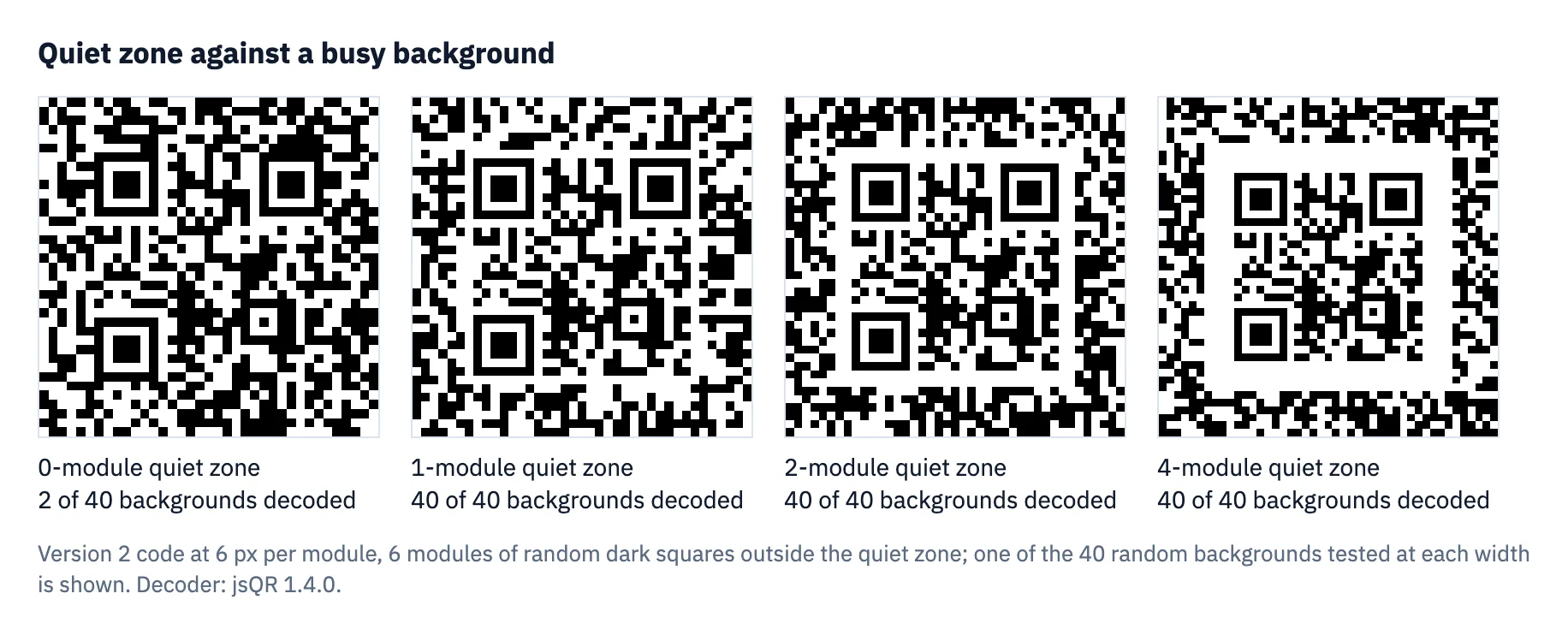
| Quiet zone (modules) | 0 | 1 | 2 | 3 | 4 |
|---|---|---|---|---|---|
| Short link, 6 px/module, sharp | 2 of 40 | 40 | 40 | 40 | 40 |
| Short link, 3 px/module, slight blur | 2 of 40 | 40 | 40 | 40 | 40 |
| Contact card (version 11), 6 px/module, sharp | 0 of 40 | 40 | 40 | 40 | 40 |
| Short link and contact card, solid black surround | not decoded | decoded | |||
Test: 40 random backgrounds per quiet-zone width, 6 modules of random dark squares outside the margin. The contact card at 3 px per module with blur is left out: that is below what it needs to decode at all, whatever the margin. Decoder jsQR 1.4.0 on synthetic images, not phone photos; how the tests work.
What real phones did
The same four widths, 0, 1, 2 and 4 modules on a busy background, were shown on a screen and scanned with an iPhone and an Android phone, each with its built-in camera app, scanning a computer screen from about 20 cm. Both phones read all four, including the code with no quiet zone at all.
Phone test: a 25 mm version 2 code, one background. One session, one distance, codes shown on a screen rather than printed; details.
What a separate camera-model test adds
| Rebuilt sample | Apple Vision | ZXing-C++ |
|---|---|---|
| B1: no quiet zone | 36/36 | 0/36 |
| B4: four-module quiet zone | 36/36 | 36/36 |
Vision read the rebuilt no-margin sample in every condition; ZXing-C++ never did. A reader that can find one borderless code does not remove the margin requirement for other readers. The experiment used a single fixed background, and these were not the phone-session files.
Separate synthetic-image study, QM-LAB-20261028, not a phone or physical-print test. Distances are projections under assumed camera settings, not measured scan ranges. Method, limits and downloadable results.
Why still design for four
The phone session and the original jsQR image test disagree: the two phones found the code even with no margin, while jsQR, the open-source decoder behind QR Meadow’s own in-browser scan check, almost never did. You do not control which reader your audience uses, and a print adds ink spread, glare and tilt that neither test had. Four modules is the figure in DENSO WAVE’s guidance; it gives readers and lighting you have not tested more margin. Neither the screen session nor the synthetic experiments guarantee a scan in the worst conditions.
Where designs lose the quiet zone
- Cropping. The white border looks like wasted space and gets trimmed in a design tool. QR Meadow’s PNG, SVG and PDF downloads include it.
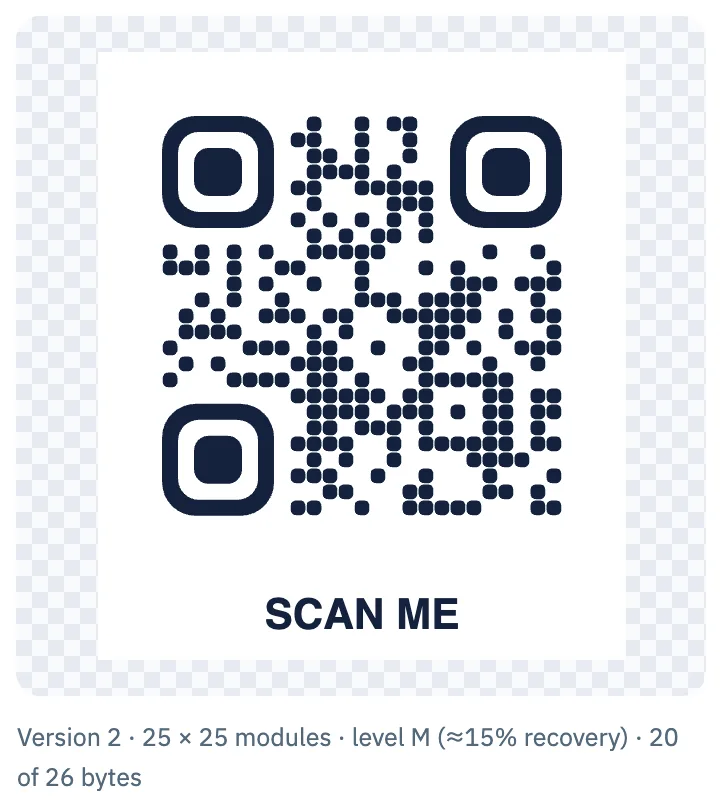
- Frames drawn too close. A border or “Scan me” banner belongs outside the margin; the generator draws its frames there:
- Busy or dark backgrounds. A code placed on a photo or pattern needs a light panel at least four modules wider than the code on every side.
- Stickers cut at the code’s edge. Include the margin in the sticker; the sticker size guide has the numbers.
- Captions and icons nearby. They count as printed. Keep them outside the margin.
Checking a finished design
- Export the artwork and open it in the QR code scanner. A design that fails on screen is unlikely to do better in print.
- Measure the margin on the final layout: at least 4 × the module width on every side.
- Scan a printed proof on the final material with several phones.
Questions
Does the quiet zone have to be white?
It has to be clear and much lighter than the code, with no print or pattern in it. A light colour works if the contrast with the dark modules stays high.
Is the quiet zone included in the QR code size?
Plan for it as part of the footprint: a 2 cm version 2 code needs a 2.64 cm square with its margin (20 × 33 ÷ 25 mm).
Sources
- DENSO WAVE, “Point for determining the code area” (quiet zone and module size)
- DENSO WAVE, “Micro QR Code”
- jsQR, the decoder used in the tests (GitHub)
Tools used in this guide
More guides
- Smallest QR code size: printer, decoder and phone limitsHow small can a QR code be? 2 cm for phones, 8.4 mm at 400 dpi, Micro QR and rMQR for tiny spaces, and a decoder test of how few pixels per module work.
- Maximum QR code size: version 40, 2,953 bytes, and how big to print itThe largest QR code is version 40: 177 × 177 modules, 2,953 bytes at level L. Capacity by level, print sizes, and how large versions fared in a decoder test.
- The QR code quiet zone: why four modules, and what happens with lessQR codes need a 4-module quiet zone. What that is in millimetres, where designs lose it, and phone and decoder tests of 0 to 4 modules on busy backgrounds.
- QR code sticker size: square, round and pre-cut labelsHow big a QR code sticker should be: code width and scan range for 1 to 4 inch square and round stickers, and how to fit codes on pre-cut labels.
- QR code size on a business card: what fits, what scansA QR code on a business card: the rules of thumb, card safe zones, and a phone test where a full vCard read at 10 mm from 20 cm.
- QR code size in pixels: exports, screens and the scaling trapHow many pixels a QR code needs: a 1024 px PNG gives a short link 31 px per module. Print resolution maths, screens, and why scaling by odd factors hurts.
- How to print QR code stickers and labels in bulkTurn a CSV into up to 500 labelled QR code stickers: styles that still scan, a label sheet or pre-cut labels, and print settings that keep the size right.
- Do QR codes expire? Static vs dynamic codes, and what the providers’ own rules sayStatic QR codes never expire; dynamic ones can stop. What five providers say happens at trial end, downgrade, cancellation or expiry, and how to choose.