QR code sticker size: square, round and pre-cut labels
For a short link, a 1 inch sticker holds a code of about 19 mm that reads from roughly 19 cm, a 2 inch sticker about 39 mm for roughly 39 cm, and a 4 inch sticker about 77 mm for roughly 77 cm. The tables below cover square and round stickers and richer content.
Square stickers
Each sticker is filled edge to edge with the code plus its four-module quiet zone (DENSO WAVE). Code widths below are without the quiet zone; ranges use the larger of a tenth of the scanning distance (Bitly) and 1/250 of the distance per module (worked out from QRStuff’s 2011 table, which assumes a 3–4 megapixel camera, so a conservative figure), never under 2 cm.
| Sticker | Version 2 (25 modules) | Version 3 (29) | Version 5 (37) |
|---|---|---|---|
| 1 in (25.4 mm) | code 19.2 mm · ~19 cm | 19.9 mm · ~17 cm | 20.9 mm · ~14 cm |
| 1.5 in (38.1 mm) | 28.9 mm · ~29 cm | 29.9 mm · ~26 cm | 31.3 mm · ~21 cm |
| 2 in (50.8 mm) | 38.5 mm · ~39 cm | 39.8 mm · ~34 cm | 41.8 mm · ~28 cm |
| 3 in (76.2 mm) | 57.7 mm · ~58 cm | 59.7 mm · ~52 cm | 62.7 mm · ~42 cm |
| 4 in (101.6 mm) | 77.0 mm · ~77 cm | 79.6 mm · ~69 cm | 83.5 mm · ~56 cm |
Module = sticker ÷ (modules + 8); code = module × modules; range = the smaller of code × 10 and module × 250. Example, a 2 in sticker with version 3: 50.8 ÷ 37 = 1.37 mm per module, code 39.8 mm, range min(398, 343) = 343 mm. The ranges come from rules of thumb, not from scanning tests.
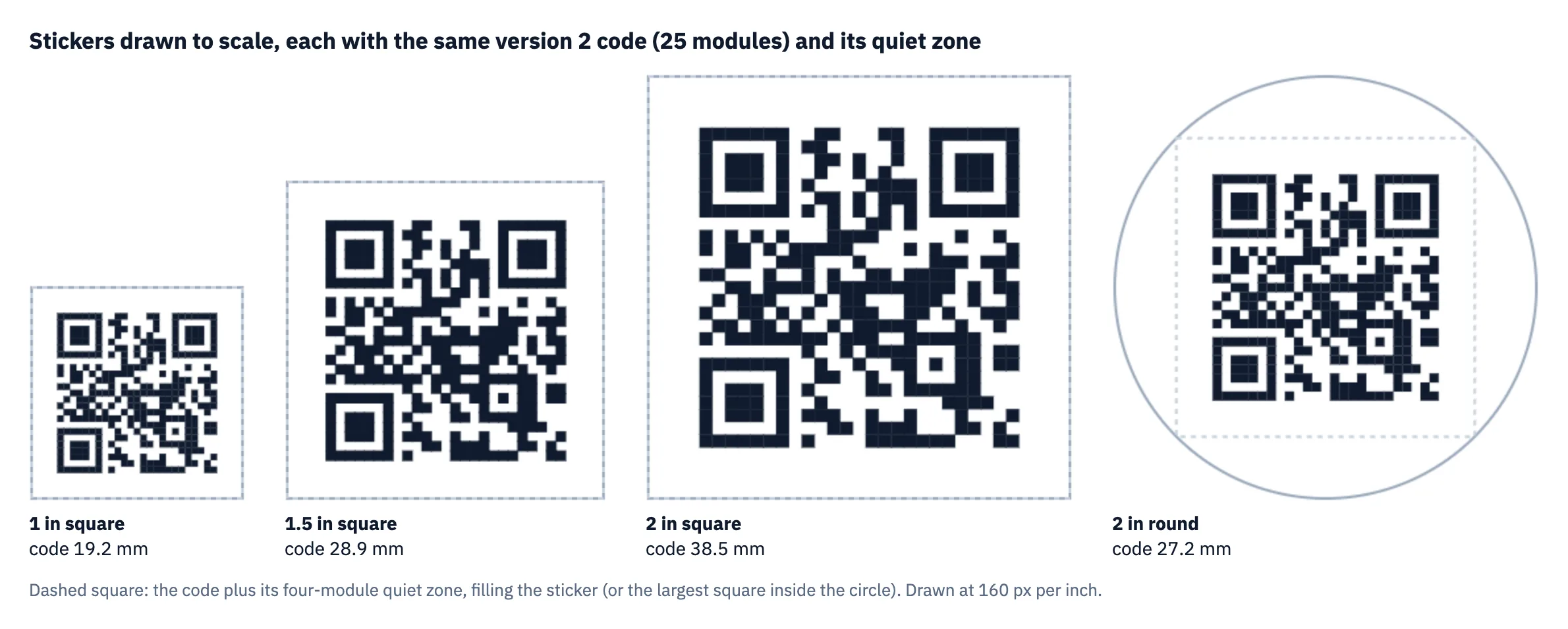
The ranges are conservative. In our phone test (an iPhone and an Android phone, each with its built-in camera app, scanning a computer screen from about 20 cm), codes from 10 to 30 mm wide all read from about 20 cm, which is farther than the table allows for the small sizes; a printed sticker in real light has less margin than a screen, so use the table when you cannot proof.
Two patterns follow. A 1 inch sticker leaves the code at or just under the 2 cm guideline, so it suits a short link on something held in the hand. And richer content costs range: on a 2 inch sticker a version 5 code reaches about 28 cm against 39 cm for version 2.
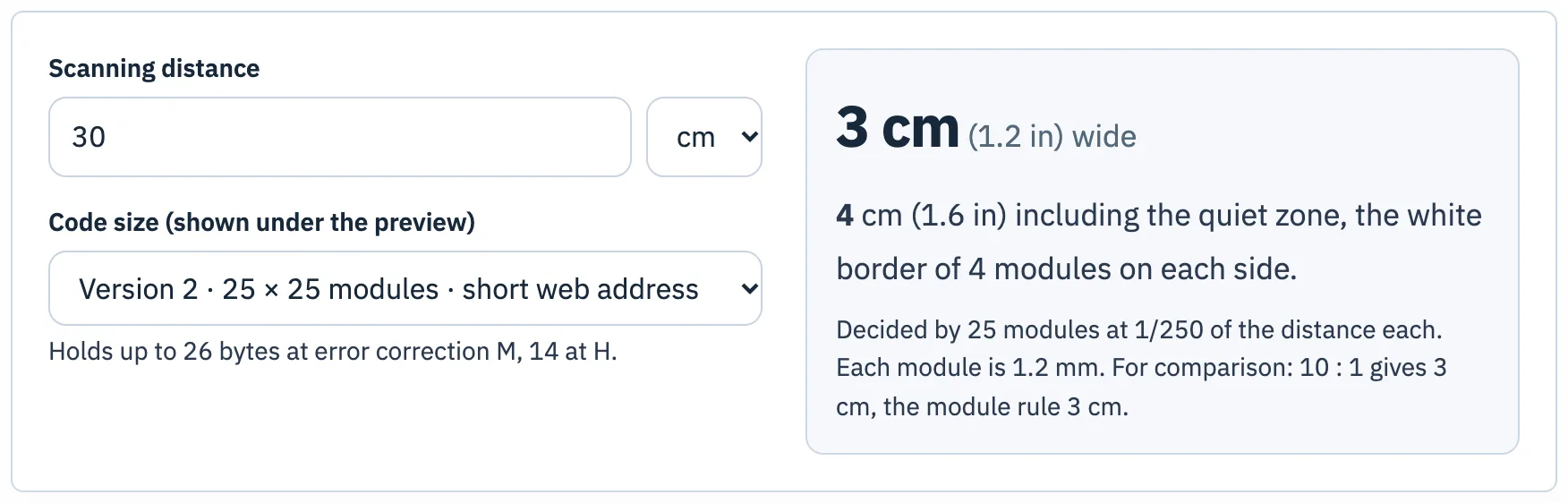
To go the other way, from the distance people will stand to the size you need, use the size calculator with the version shown under the generator’s preview:
Round stickers
A square code in a circle only gets the largest square that fits: the diameter divided by √2, about 0.707 of it. The quiet zone must fit inside that square too.
| Round sticker | Largest square | Version 2 code · range | Version 3 code · range |
|---|---|---|---|
| 1 in (25.4 mm) | 18.0 mm | 13.6 mm · ~14 cm | 14.1 mm · ~12 cm |
| 1.5 in (38.1 mm) | 26.9 mm | 20.4 mm · ~20 cm | 21.1 mm · ~18 cm |
| 2 in (50.8 mm) | 35.9 mm | 27.2 mm · ~27 cm | 28.2 mm · ~24 cm |
The parts of the circle outside that square can carry a label or logo, as long as nothing enters the quiet zone. A 1 inch round sticker is below the 2 cm guideline for any version.
Pre-cut labels
Pre-cut label sheets fix the size for you. Avery 22806, for example, is a 2" × 2" square label, 12 per sheet, and Avery offers blank templates for it in Word, PDF, Illustrator and other formats. From the square table above, a 2" label holds a version 2 or 3 code of about 39 mm with its quiet zone. To fill such a sheet, download the codes as SVG from the bulk generator and place one per label in the template; the bulk generator’s own label sheet uses equal cells with a 10 mm page margin, which will not line up with a pre-cut product. The printing guide walks through both routes.
Before ordering
- Use the shortest content that works; version 2 or 3 gives the biggest modules on a small sticker.
- Keep the quiet zone inside the sticker, especially on dark or patterned surfaces.
- Send the printer SVG or PDF and print one sticker on the real material before ordering the rest.
Questions
How big is the QR code on a 2 inch sticker?
With the quiet zone inside the sticker, about 38.5 mm for a version 2 code and 39.8 mm for version 3 on a square sticker; about 27 to 28 mm on a round one.
Can I put a QR code on a round sticker?
Yes, but only the largest square inside the circle is usable: about 0.707 of the diameter, including the quiet zone.
Sources
- Bitly, “What’s the Minimum Size for a QR Code?”
- QRStuff, “QR Code Minimum Size” (module size table)
- DENSO WAVE, “Point for determining the code area” (quiet zone and module size)
- Avery, Template 22806 (2" × 2" square labels, 12 per sheet)
Tools used in this guide
More guides
- Smallest QR code size: printer, decoder and phone limitsHow small can a QR code be? 2 cm for phones, 8.4 mm at 400 dpi, Micro QR and rMQR for tiny spaces, and a decoder test of how few pixels per module work.
- Maximum QR code size: version 40, 2,953 bytes, and how big to print itThe largest QR code is version 40: 177 × 177 modules, 2,953 bytes at level L. Capacity by level, print sizes, and how large versions fared in a decoder test.
- The QR code quiet zone: why four modules, and what happens with lessQR codes need a 4-module quiet zone. What that is in millimetres, where designs lose it, and phone and decoder tests of 0 to 4 modules on busy backgrounds.
- QR code sticker size: square, round and pre-cut labelsHow big a QR code sticker should be: code width and scan range for 1 to 4 inch square and round stickers, and how to fit codes on pre-cut labels.
- QR code size on a business card: what fits, what scansA QR code on a business card: the rules of thumb, card safe zones, and a phone test where a full vCard read at 10 mm from 20 cm.
- QR code size in pixels: exports, screens and the scaling trapHow many pixels a QR code needs: a 1024 px PNG gives a short link 31 px per module. Print resolution maths, screens, and why scaling by odd factors hurts.
- How to print QR code stickers and labels in bulkTurn a CSV into up to 500 labelled QR code stickers: styles that still scan, a label sheet or pre-cut labels, and print settings that keep the size right.
- Do QR codes expire? Static vs dynamic codes, and what the providers’ own rules sayStatic QR codes never expire; dynamic ones can stop. What five providers say happens at trial end, downgrade, cancellation or expiry, and how to choose.