QR code size in pixels: exports, screens and the scaling trap
A 1024 × 1024 PNG from QR Meadow gives a short link 31 pixels per module and a full contact card 14. For print, the pixels you need are millimetres ÷ 25.4 × dpi. On screens, how the image is scaled matters more than its size.
Count pixels per module
A QR code of version v has 17 + 4v modules per side (DENSO WAVE) plus a four-module quiet zone on each side. QR Meadow’s PNG export gives every module a whole number of pixels, the largest that fits the chosen size, and adds any leftover pixels to the margin:
| Content | Modules (+ quiet zone) | 512 px PNG | 1024 px | 2048 px |
|---|---|---|---|---|
| Short link, version 2 | 25 (33) | 15 px per module | 31 | 62 |
| Wi-Fi network, version 3 | 29 (37) | 13 | 27 | 55 |
| Contact card, version 11 | 61 (69) | 7 | 14 | 29 |
Pixels per module = ⌊PNG width ÷ (modules + 8)⌋. A short link at 512 px: ⌊512 ÷ 33⌋ = 15; the remaining 512 − 15 × 33 = 17 pixels become extra margin.
Pixels for print
Printed width in pixels is millimetres ÷ 25.4 × dpi. At 300 dpi:
| Printed code width | Pixels at 300 dpi | Pixels at 600 dpi | Smallest PNG that covers 300 dpi |
|---|---|---|---|
| 2 cm | 236 | 472 | 512 px |
| 3 cm | 354 | 709 | 512 px |
| 5 cm | 591 | 1,181 | 1024 px |
| 10 cm | 1,181 | 2,362 | 2048 px |
For print it is simpler to skip pixels: the SVG and PDF downloads are vector, and the PDF can be saved 2, 3, 5 or 10 cm wide.
The scaling trap
When an image is shown or printed at a size that is not a whole multiple of its module grid, module edges fall between pixels and turn grey. In the decoder test, that mattered more than resolution for large codes:
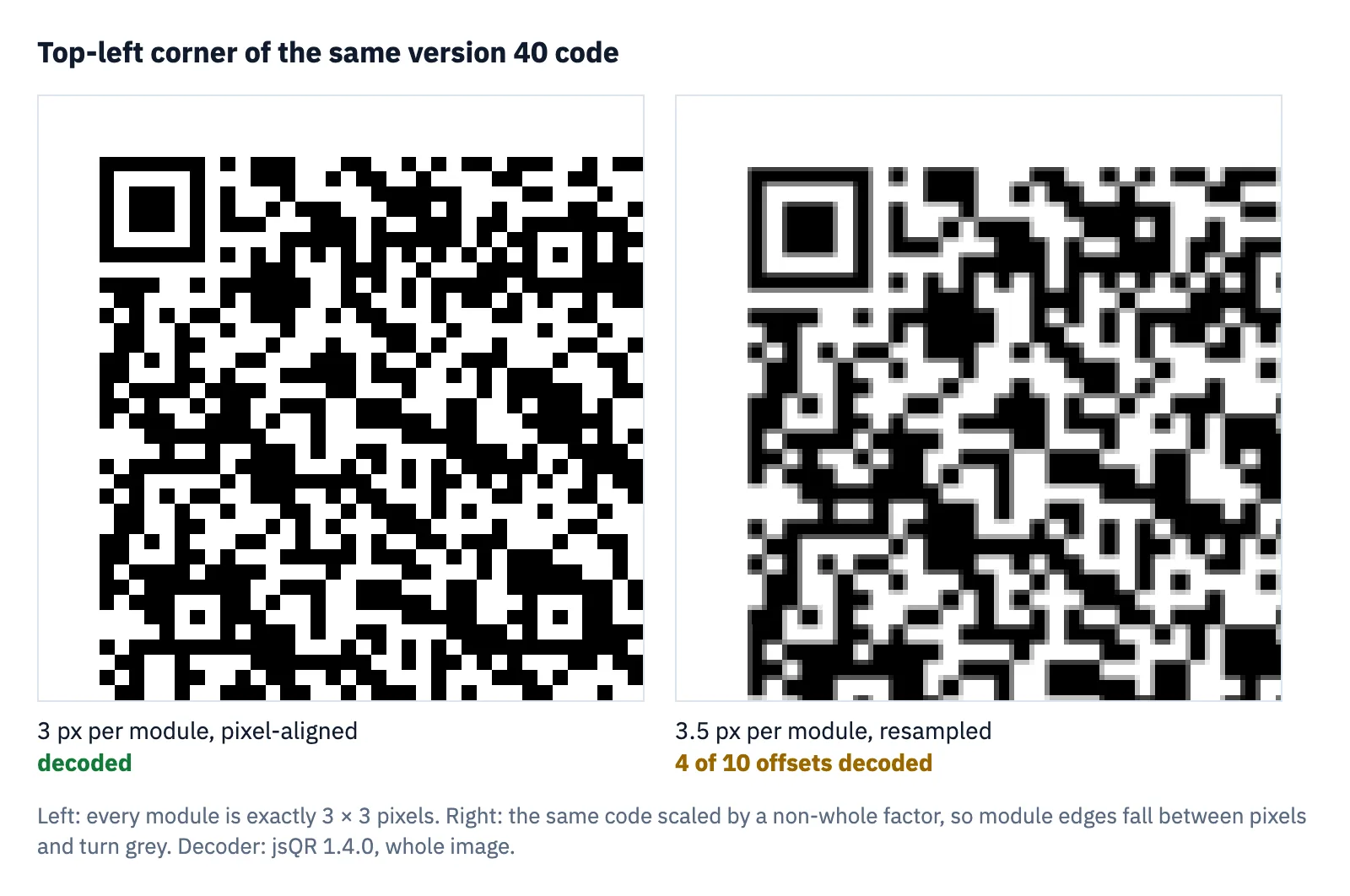
Every pixel-aligned image decoded, at 1, 2 or 3 pixels per module, version 40 included. Resampled, a version 40 code decoded at 4 of 10 offsets at 3.5 pixels per module and 0 of 10 at 6.5; the maximum size guide has the full table. Short codes were far less sensitive: a short link decoded at every offset from 1.75 pixels per module in sharp images.
Test: version 40 at level L, averaged down to each resolution at 10 random sub-pixel offsets, against images where every module is exactly 1, 2 or 3 pixels. Decoder jsQR 1.4.0 on synthetic images, not phone photos; how the tests work.
Phone camera apps are more forgiving: in our phone test both an iPhone and an Android phone read a 50 mm version 40 code from a screen. The trap matters most where the reader is a simpler decoder, such as a web page or app that scans images with an open-source library, and for codes near the top of the version range.
What a separate camera-model test adds
Export pixels are not the pixels that reach a decoder after camera capture. In the declared 1920 × 1080, 60° model, a front-facing 10 mm version 11 symbol projects to approximately 1.82, 1.36 and 0.91 pixels per module at model distances of 15, 20 and 30 cm. The starting PDF was rasterised at 300 dpi; it did not guarantee that each captured module would have enough pixels.
Those distances depend on the assumed field of view and resolution. They are not calibrated to a phone, and the model omits camera processing. Use the result to understand why a large export can still be hard to capture, not to promise a particular scanning range.
Separate synthetic-image study, QM-LAB-20261028, not a phone or physical-print test. Distances are projections under assumed camera settings, not measured scan ranges. Method, limits and downloadable results.
Codes on screens and in emails
Web pages size images in CSS pixels, and high-density displays draw each CSS pixel with several physical pixels; the ratio is the device pixel ratio, which depends on the device (MDN). Unless the displayed size times that ratio matches the image’s own grid, the browser resamples the code. What helps:
- Use SVG where you can. A vector code is drawn at whatever size the page needs, with sharp edges.
- Shrink rather than enlarge. Export a PNG at least as large as it will appear on the largest screen, and keep codes on screens short: a version 2 or 3 code tolerated resampling far better than version 40 in the test.
- If a small PNG must be enlarged, CSS
image-rendering: pixelatedscales it by nearest neighbour to a whole multiple first, keeping edges hard (MDN).
Questions
What size PNG should I download for printing?
512 px covers a 3 cm code at 300 dpi, 1024 px a 5 cm code and 2048 px a 10 cm code. For any size, the SVG or PDF is sharper.
How do I convert QR code pixels to centimetres?
Centimetres = pixels ÷ dpi × 2.54. A 1024 px PNG printed at 300 dpi is 1024 ÷ 300 × 2.54 ≈ 8.7 cm wide, quiet zone included.
Sources
- DENSO WAVE, “Information capacity and versions of QR Code”
- MDN, Window: devicePixelRatio property
- MDN, image-rendering
- jsQR, the decoder used in the tests (GitHub)
Tools used in this guide
More guides
- Smallest QR code size: printer, decoder and phone limitsHow small can a QR code be? 2 cm for phones, 8.4 mm at 400 dpi, Micro QR and rMQR for tiny spaces, and a decoder test of how few pixels per module work.
- Maximum QR code size: version 40, 2,953 bytes, and how big to print itThe largest QR code is version 40: 177 × 177 modules, 2,953 bytes at level L. Capacity by level, print sizes, and how large versions fared in a decoder test.
- The QR code quiet zone: why four modules, and what happens with lessQR codes need a 4-module quiet zone. What that is in millimetres, where designs lose it, and phone and decoder tests of 0 to 4 modules on busy backgrounds.
- QR code sticker size: square, round and pre-cut labelsHow big a QR code sticker should be: code width and scan range for 1 to 4 inch square and round stickers, and how to fit codes on pre-cut labels.
- QR code size on a business card: what fits, what scansA QR code on a business card: the rules of thumb, card safe zones, and a phone test where a full vCard read at 10 mm from 20 cm.
- QR code size in pixels: exports, screens and the scaling trapHow many pixels a QR code needs: a 1024 px PNG gives a short link 31 px per module. Print resolution maths, screens, and why scaling by odd factors hurts.
- How to print QR code stickers and labels in bulkTurn a CSV into up to 500 labelled QR code stickers: styles that still scan, a label sheet or pre-cut labels, and print settings that keep the size right.
- Do QR codes expire? Static vs dynamic codes, and what the providers’ own rules sayStatic QR codes never expire; dynamic ones can stop. What five providers say happens at trial end, downgrade, cancellation or expiry, and how to choose.